Monday, 28 August 2017

Production Planning in a cross plant set-up

This document explains the steps required to configure a system for Production planning in a cross plant set-up. It has been observed that many members post questions with a bit of variation regarding this scenario. Hopefully this blog will address any current and future queries regarding this topic.

Scenario:


Cross plant production is one of the key parts of SAP – Production Planning, it is also know as production in alternative plant. In this document we will use Special procurement types 70 and 80 to address this scenario, thus eliminating the need of doing any transfer postings.

Prerequisites – Create Master Data i.e.
Material Master (FERT, HALB and ROH)
BOM                  (FERT and HALB)
Routing              (FERT and HALB)
Work Centers

HALB will be created in 3350 plant, while FERT and ROH will exist in both plants by extending them to the other plant through MM01.
We will be working on MTS – Make to Stock strategy.
Production Planning, SAP PP Module, SAP All Modules, SAP Guides, SAP Learning, SAP Certifications, SAP Tutorial and Material

Production Planning, SAP PP Module, SAP All Modules, SAP Guides, SAP Learning, SAP Certifications, SAP Tutorial and Material

Only configuration required in this scenario is to configure special procurement types 70 and 80.

Production Planning, SAP PP Module, SAP All Modules, SAP Guides, SAP Learning, SAP Certifications, SAP Tutorial and Material

For plant 3300 we will use special procurement type 80. We will mention plant 3350 in special procurement section of [ Prod. Other plant ].

Production Planning, SAP PP Module, SAP All Modules, SAP Guides, SAP Learning, SAP Certifications, SAP Tutorial and Material

For plant 3350 we will use special procurement type 70. We will mention plant 3300 as issuing plant in the ‘As BOM component’ section. Make sure there’s a tick at the box of withdr.altern.plant (withdrawal from alternate plant).

Production Planning, SAP PP Module, SAP All Modules, SAP Guides, SAP Learning, SAP Certifications, SAP Tutorial and Material

Special procurement 70 will be assigned to HALB’s BOM component. We will select ROH material in the BOM and click on item (or press F7). T.Code CS02

Production Planning, SAP PP Module, SAP All Modules, SAP Guides, SAP Learning, SAP Certifications, SAP Tutorial and Material

Special procurement 80 will be assigned in FERT’s MRP 2 view in plant 3300. T.Code MM02

Production Planning, SAP PP Module, SAP All Modules, SAP Guides, SAP Learning, SAP Certifications, SAP Tutorial and Material

After completing all of the above tasks we will proceed with a real time test. For FERT material, stock of 50 already exists thus we will have to add this in our future calculations.

Production Planning, SAP PP Module, SAP All Modules, SAP Guides, SAP Learning, SAP Certifications, SAP Tutorial and Material

Now we will go to PIR planning table T.code MD61, and enter the value of 100. Make sure the date is not on a holiday.

Production Planning, SAP PP Module, SAP All Modules, SAP Guides, SAP Learning, SAP Certifications, SAP Tutorial and Material

You can double check the planned qty and its date in Schedule lines tab.
Production Planning, SAP PP Module, SAP All Modules, SAP Guides, SAP Learning, SAP Certifications, SAP Tutorial and Material

After running the MRP (T.Code MD02) we will go to stock requirement list of FERT material. Here you can see IndReq of 100 and planned order of 50 quantity. Reason being that 50 qty of FERT is already available in unrestricted stock, so that stock will be consumed first. You can also see supplying plant as 3350 because FERT material will be manufactured in plant 3350.

Production Planning, SAP PP Module, SAP All Modules, SAP Guides, SAP Learning, SAP Certifications, SAP Tutorial and Material

For FERT Material in plant 3350 (T.code MD04) you can see Planned order for 50 qty while 3300 plant is showing as planning plant.

Production Planning, SAP PP Module, SAP All Modules, SAP Guides, SAP Learning, SAP Certifications, SAP Tutorial and Material

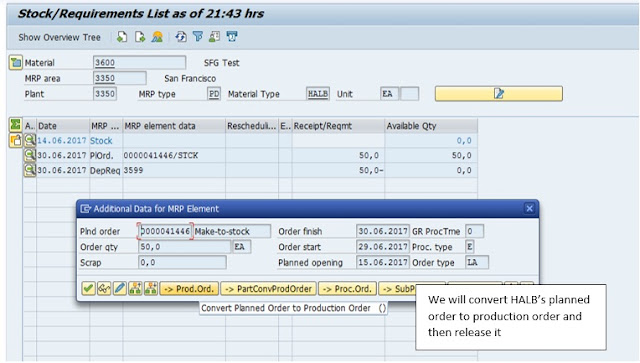
For HALB Material in plant 3350 you can see a planned order of quantity 50.

Production Planning, SAP PP Module, SAP All Modules, SAP Guides, SAP Learning, SAP Certifications, SAP Tutorial and Material

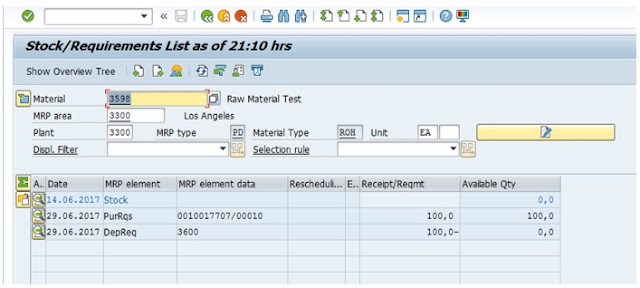
For ROH Material you can see DepReq of 100 and PurRqs of 100. That’s because in one HALB material 2 ROH materials are consumed.

Production Planning, SAP PP Module, SAP All Modules, SAP Guides, SAP Learning, SAP Certifications, SAP Tutorial and Material

Convert Purchase requisition of ROH to purchase order and do GR in plant 3300.

Production Planning, SAP PP Module, SAP All Modules, SAP Guides, SAP Learning, SAP Certifications, SAP Tutorial and Material

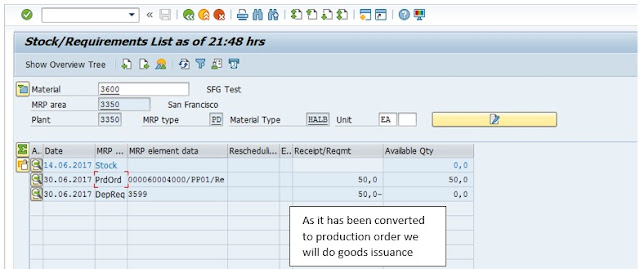
Convert planned order of HALB to production order.

Production Planning, SAP PP Module, SAP All Modules, SAP Guides, SAP Learning, SAP Certifications, SAP Tutorial and Material

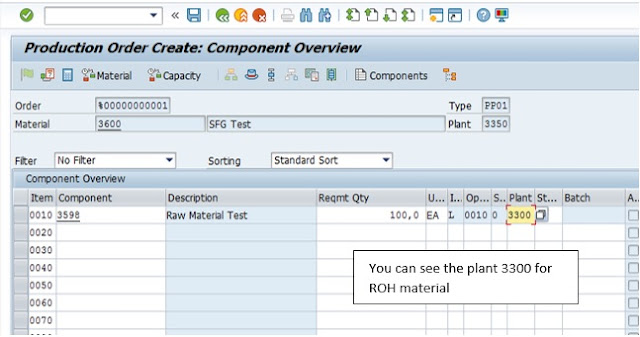
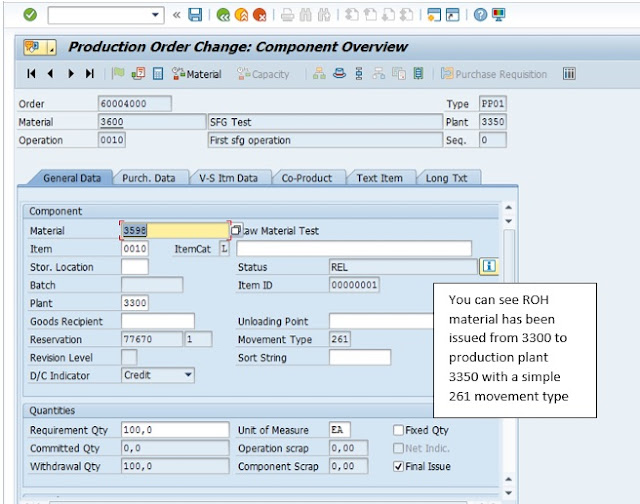
In component overview of HALB’s production order you can see 3300 plant for ROH material.

Production Planning, SAP PP Module, SAP All Modules, SAP Guides, SAP Learning, SAP Certifications, SAP Tutorial and Material

Production Planning, SAP PP Module, SAP All Modules, SAP Guides, SAP Learning, SAP Certifications, SAP Tutorial and Material

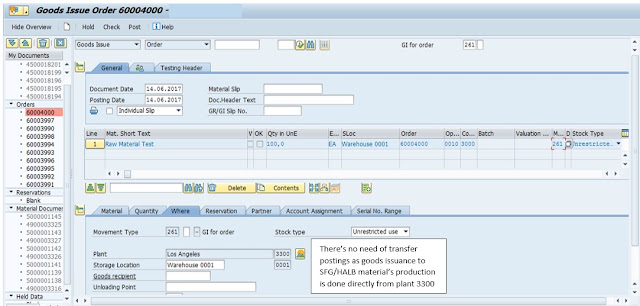
Now we will do goods issuance (Movement type 261) on the production order of HALB material.

Production Planning, SAP PP Module, SAP All Modules, SAP Guides, SAP Learning, SAP Certifications, SAP Tutorial and Material

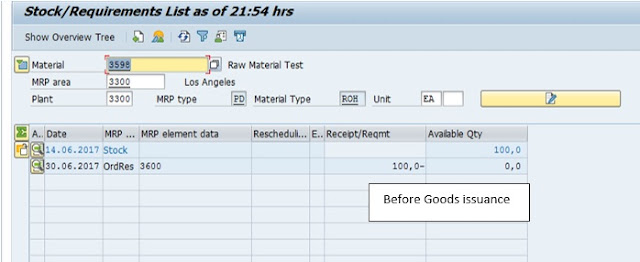
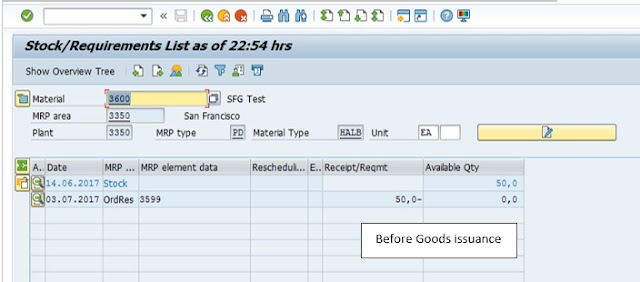
Before Goods issuance, ROH material stock is 100.

Production Planning, SAP PP Module, SAP All Modules, SAP Guides, SAP Learning, SAP Certifications, SAP Tutorial and Material

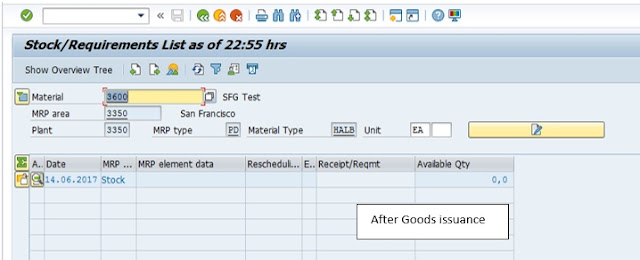
After Goods issuance, ROH material stock reduces to zero. Point to notice is that there were no transfer postings done.

Production Planning, SAP PP Module, SAP All Modules, SAP Guides, SAP Learning, SAP Certifications, SAP Tutorial and Material

Production Planning, SAP PP Module, SAP All Modules, SAP Guides, SAP Learning, SAP Certifications, SAP Tutorial and Material

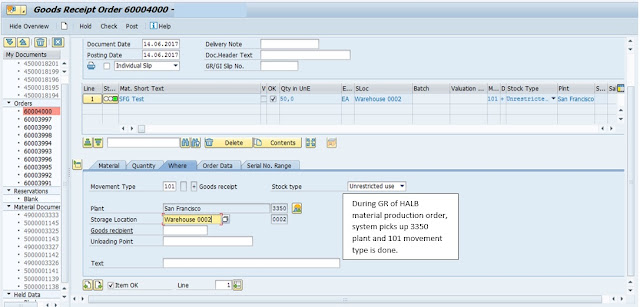
After doing Confirmation of HALB’s production order we will do Goods Receipt of HALB material.

Production Planning, SAP PP Module, SAP All Modules, SAP Guides, SAP Learning, SAP Certifications, SAP Tutorial and Material

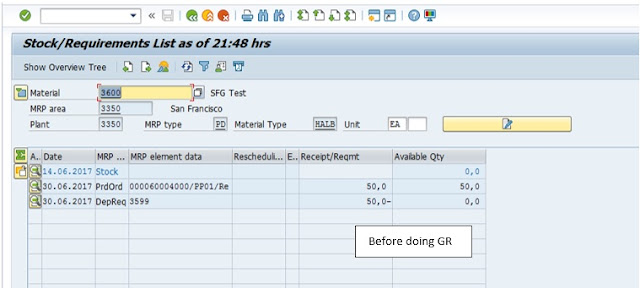
Before GR of HALB

Production Planning, SAP PP Module, SAP All Modules, SAP Guides, SAP Learning, SAP Certifications, SAP Tutorial and Material

After GR of HALB. 50 quantity has been added to stock.

Production Planning, SAP PP Module, SAP All Modules, SAP Guides, SAP Learning, SAP Certifications, SAP Tutorial and Material

After GR of HALB material, we will convert planned order of FERT to Production order. Note supplying plant is 3350.

Production Planning, SAP PP Module, SAP All Modules, SAP Guides, SAP Learning, SAP Certifications, SAP Tutorial and Material

Planning plant and MRP area for FERT’s production order is coming as 3300

Production Planning, SAP PP Module, SAP All Modules, SAP Guides, SAP Learning, SAP Certifications, SAP Tutorial and Material

Production Planning, SAP PP Module, SAP All Modules, SAP Guides, SAP Learning, SAP Certifications, SAP Tutorial and Material

Production Planning, SAP PP Module, SAP All Modules, SAP Guides, SAP Learning, SAP Certifications, SAP Tutorial and Material

Now we will do goods issuance to FERT’s production order. 261 movement type is done.

Production Planning, SAP PP Module, SAP All Modules, SAP Guides, SAP Learning, SAP Certifications, SAP Tutorial and Material

Now we will do goods issuance to FERT’s production order. 261 movement type is done.

Production Planning, SAP PP Module, SAP All Modules, SAP Guides, SAP Learning, SAP Certifications, SAP Tutorial and Material

Production Planning, SAP PP Module, SAP All Modules, SAP Guides, SAP Learning, SAP Certifications, SAP Tutorial and Material

In FERT material’s Production order HALB’s withdrawal quantity is coming as 50

Production Planning, SAP PP Module, SAP All Modules, SAP Guides, SAP Learning, SAP Certifications, SAP Tutorial and Material

After confirmation of production order we will do GR of FERT material.

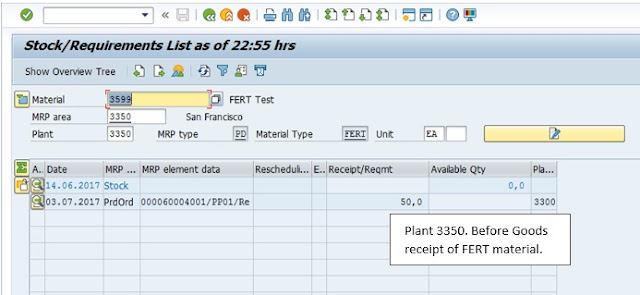
But before that you can see for plant 3300, FERT’s material Stock/requirement list is showing 3350 as supplying plant while for plant 3350 Stock/requirement list is showing 3300 as planning plant.

Production Planning, SAP PP Module, SAP All Modules, SAP Guides, SAP Learning, SAP Certifications, SAP Tutorial and Material

Production Planning, SAP PP Module, SAP All Modules, SAP Guides, SAP Learning, SAP Certifications, SAP Tutorial and Material

We will go to MIGO and do GR of FERT’s production order. It will be done directly to 3300 plant 0001 Sloc without the need of any transfer postings.

Production Planning, SAP PP Module, SAP All Modules, SAP Guides, SAP Learning, SAP Certifications, SAP Tutorial and Material

After GR, stock in 3300 plant has increased from 50 to 100

Production Planning, SAP PP Module, SAP All Modules, SAP Guides, SAP Learning, SAP Certifications, SAP Tutorial and Material

After GR, stock in 3350 plant has decreased to zero.

Production Planning, SAP PP Module, SAP All Modules, SAP Guides, SAP Learning, SAP Certifications, SAP Tutorial and Material

Production Planning, SAP PP Module, SAP All Modules, SAP Guides, SAP Learning, SAP Certifications, SAP Tutorial and Material

You can see in Stock overview list (T.Code MMBE) that stock in ‘unrestricted use’ is 100 for plant 3300 in 0001 Sloc, while stock is Zero for plant 3350. Production Cost will be collected in production plant 3350.

Friday, 25 August 2017

MRP on SAP S/4 HANA: Insight to Action

Material Requirement planning key process in production to maintain optimized level of inventory while producing the product at expected timeline and cost. SAP has versatile Material requirement planning tool which has served as most useful for years. Increasing inventory cost improved computing capability brings the expectation of further improvement of MRP.

These are few challenges with current MRP tool:

◈ Long and resource intensive MRP run means a periodic and batch process.
◈ New Demand and Supply changes make MRP plan immediately outdated.
◈ No real time single view for material information and shortages.
◈ Navigation to multiple ERP transaction to evaluate solution alternatives.

Improving Manufacturing to next level will need below goal to be achieved:

SAP MRP, SAP ERP, SAP All Modules List, SAP Module, SAP Learning, SAP Material, SAP Guides, SAP Certifications

SAP S/4 HANA as digital core is capable to execute data intensive MRP process with unprecedented speed. MRP Live (MD01N) optimizes process to reduce MRP run time up to 10 fold and makes MRP Fast, Simple and Cross Plant.

S/4 HANA 1610 is not just about the speed of MRP execution but also provide Smart solution to manage material shortages and other requirement around MRP.  In scope of this blog we will discuss FIORI Apps available in S/4 HANA 1610. Below is snapshot of All MRP related FIORI app available with 1610.

SAP S/4HANA, SAP ERP, SAP All Modules List, SAP Module, SAP Learning, SAP Material, SAP Guides, SAP Certifications

Material availability can be influenced by several factors like delayed material status, Sales Order fulfillment, change in customer order and several others. MRP controller should be aware of real time material shortage situation.

Manage Material Shortages

With S4 HANA FIORI apps MRP Controller will see all relevant information side by side allowing him to have quick look and meaningful insight to take immediate action.

Below is snapshot of Material shortages for the MRP Planner.

SAP S/4HANA, SAP ERP, SAP All Modules List, SAP Module, SAP Learning, SAP Material, SAP Guides, SAP Certifications

This app highlight issue across thousands of material stock situation. MRP Planner has option to check stock requirement list from the same app.

SAP S/4HANA, SAP ERP, SAP All Modules List, SAP Module, SAP Learning, SAP Material, SAP Guides, SAP Certifications

Solution doesn’t only show the material shortage situation but also recommend solution with option to simulate the possible solution and check viability.

SAP S/4HANA, SAP ERP, SAP All Modules List, SAP Module, SAP Learning, SAP Material, SAP Guides, SAP Certifications

Insight to action capability of solution help to resolve the issue before it happens.

Manage Change Requests - MRP

Change request can be raised when using app for managing material and uncovered requirement. App for new, requested and answered change request are available MRP Planner.

SAP S/4HANA, SAP ERP, SAP All Modules List, SAP Module, SAP Learning, SAP Material, SAP Guides, SAP Certifications

Proposed changes can be requested from vendor and status can be updated from Answered to Closed upon response of vendor.

SAP S/4HANA, SAP ERP, SAP All Modules List, SAP Module, SAP Learning, SAP Material, SAP Guides, SAP Certifications

Email can be sent to vendor and on their response changes to Purchase order or stock transfer order can be applied.

Manage Production Order

Production order can also be managed from MRP cockpit. Manage Production order app provide list of your order with uncovered items.

SAP S/4HANA, SAP ERP, SAP All Modules List, SAP Module, SAP Learning, SAP Material, SAP Guides, SAP Certifications

Individual production order at app has Stock Requirement list, Component info, Milestone, Material overview and order detail. User can also navigate to fact sheets and back end transaction.

SAP S/4HANA, SAP ERP, SAP All Modules List, SAP Module, SAP Learning, SAP Material, SAP Guides, SAP Certifications

Manage Internal and External requirement:

There are separate apps available for Internal and external requirements. MRP controller can check the coverage of component required for in-house Production Order, Process order, Maintenance order and network order. Solution recommendation are available for handling shortage situation similar to material Shortages app.

SAP S/4HANA, SAP ERP, SAP All Modules List, SAP Module, SAP Learning, SAP Material, SAP Guides, SAP Certifications

Manage external requirement app provide view of uncovered and delayed items required for sales order and STO. App recommend solution to overcome the situation with preview capability.

SAP S/4HANA, SAP ERP, SAP All Modules List, SAP Module, SAP Learning, SAP Material, SAP Guides, SAP Certifications

Display MRP Material Issues:

This app provides view of material for which issues occurred in MRP execution. Planner can get the information to analyzes the issue with material for which problem occurred in the planning run.

MRP scheduling and Key figures:

Planner can schedule MRP from Fiori app and review the status of the MRP execution.

SAP S/4HANA, SAP ERP, SAP All Modules List, SAP Module, SAP Learning, SAP Material, SAP Guides, SAP Certifications

MRP Key Figures:

SAP S/4HANA, SAP ERP, SAP All Modules List, SAP Module, SAP Learning, SAP Material, SAP Guides

Exception handling based on real time data and early identification of issues with different materials improves material flow and reduce lead time of product development.

Transformed user experience for the material planner has great potential to boost Planner productivity. Simplified and Insightful FIORI Application gives delightful user experience to the Material Planners.

Thursday, 24 August 2017

Using Predictive Analytics and Python on SAP Cloud Platform HANA database - Part 2

This blog is a continuation of the previous blog which focused on connecting an on-premise redictive Analytics software with HANA database on the Cloud Platform. Python is sometime used to implement data science in conjunction with Predictive analytics.

In this blog, I will show you how to connect a Python program to a HANA database available on SAP Cloud Platform. The process to connect to the database is slightly different it is on SAP Cloud Platform.

I am going to use the same “hcpta” HANA database used in the previous blog.

SAP Cloud Platform, SAP HANA Live, SAP HANA Tutorial, SAP HANA Certifications, SAP Certifications, SAP All Modules List

I have setup a Cloud Connector which setup a connection to the account in Cloud Platform. I have also registered a service channel for hcpta database on port 39815

SAP Cloud Platform, SAP HANA Live, SAP HANA Tutorial, SAP HANA Certifications, SAP Certifications, SAP All Modules List

I have installed Python on my laptop .

SAP Cloud Platform, SAP HANA Live, SAP HANA Tutorial, SAP HANA Certifications, SAP Certifications, SAP All Modules List

To connect to HANA database, I am using a python client which is available in github.

The installation steps are documented and you can follow them to prepare python.

SAP Cloud Platform, SAP HANA Live, SAP HANA Tutorial, SAP HANA Certifications, SAP Certifications, SAP All Modules List

The github has got sample code which explains how to use each of the methods.

Below is a sample program which creates a table and inserts a record. I have used localhost as the Cloud Connector is also installed on the same laptop.

import pyhdb

connection = pyhdb.connect(
    host="localhost",
    port=39815,
    user="<HANA_DB_USER>",
    password="<HANA_DB_PASSWORD>"
)
cursor = connection.cursor()
cursor.execute('CREATE TABLE PYHDB_TABLE("NAMES" VARCHAR (255) null)')
print ("Table PYHDB_TAB created ")
cursor.execute("INSERT INTO PYHDB_TABLE VALUES('Hello Python')")
print ("Record Inserted into PYHDB_TABLE")
connection.commit()
connection.close()

After executing this script, I could see the table created in my HANA database in the Cloud Platform.

Below is the new table which is created in my schema along with the record.

SAP Cloud Platform, SAP HANA Live, SAP HANA Tutorial, SAP HANA Certifications, SAP Certifications, SAP All Modules List

This shows how you can connect Python to a HANA database on Cloud Platform and perform DDL/DML operations.