Showing posts with label UI Web Dynpro ABAP. Show all posts

Thursday, 29 December 2016

Enhancements in Web Dynpro ABAP-Part II

In part I , we have seen about enhancing the view and window of the standard web Dynpro ABAP component, in this Part we will be seeing about Enhancement of controller and deleting an Enhancement.

Enhancement of controller:


Enhancement of controller consist of enhancements of Context Nodes, Attributes, methods and actions.

Context Node Enhancement:


Each controller will be having the context assigned to it, Context nodes/attributes can be enhanced or new nodes/Attributes can be assigned to the context.

There will be two kinds of nodes,
  • Nodes without Dictionary structure mapping
  • Nodes with Dictionary structure mapping
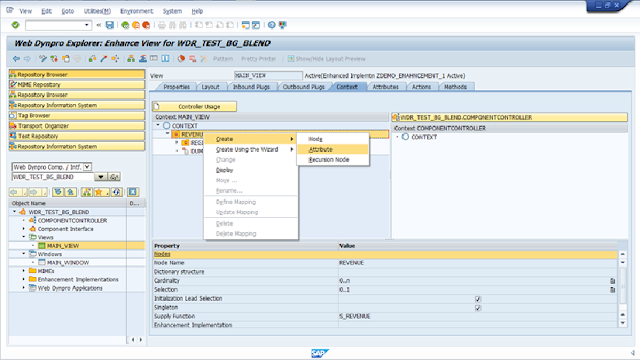
IF the node is without DD mapping then you can add the attributes to it by right click on it -> create – > attribute.

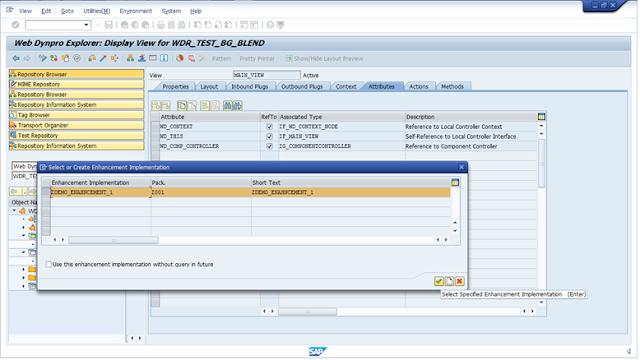
Before to this step enable the enhancement implementation.

SAP UI  Web Dynpro ABAP, SAP Guides, SAP All Modules, SAP Tutorials and Materials, SAP Live, SAP Learning

SAP UI  Web Dynpro ABAP, SAP Guides, SAP All Modules, SAP Tutorials and Materials, SAP Live, SAP Learning

IF the node is with DD mapping then you can add the attributes to it by right click on it -> create using wizard- > attributes from components of structure. 

SAP UI  Web Dynpro ABAP, SAP Guides, SAP All Modules, SAP Tutorials and Materials, SAP Live, SAP Learning

Similarly you can add new nodes or attributes also to the same context by right click on the root context.

SAP UI  Web Dynpro ABAP, SAP Guides, SAP All Modules, SAP Tutorials and Materials, SAP Live, SAP Learning

Attribute Enhancement:


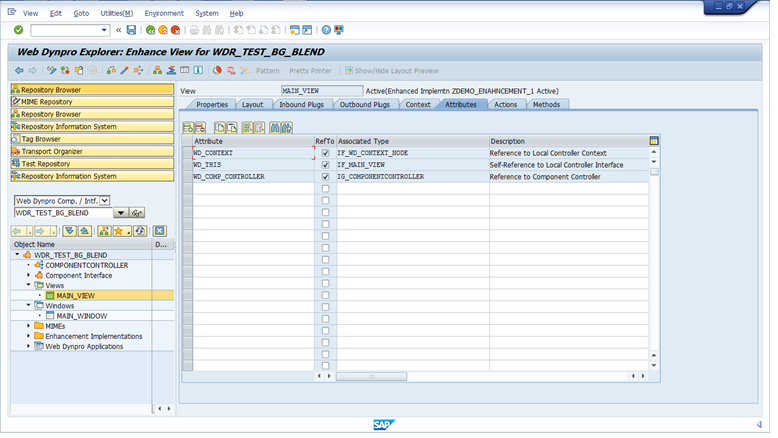
To enhance the attributes tab go to the required controller, and enable the enhancement implementation.
SAP UI  Web Dynpro ABAP, SAP Guides, SAP All Modules, SAP Tutorials and Materials, SAP Live, SAP Learning

Then the attributes tab will be enabled with Edit mode hence whatever the new additions are required or Existing attribute Edit( Except standard WD attribute) we can do here.
SAP UI  Web Dynpro ABAP, SAP Guides, SAP All Modules, SAP Tutorials and Materials, SAP Live, SAP Learning

Enhancements of method and actions:


There will be two possible things we can do in methods, Enhancing the existing method or adding new method

First enable enhancement implementation for the methods tab.

Then the tab will be converted into Edit mode hence we can add new methods here like normal Edit.

Enhancement of the existing methods can be done in any of the following 3 ways.
  • Pre Exit
  • Post Exit
  • Overwrite Exit
SAP UI  Web Dynpro ABAP, SAP Guides, SAP All Modules, SAP Tutorials and Materials, SAP Live, SAP Learning

We are not going to change the code of the existing method, instead we will select the Exit option & a new method will be created there we can write our business logic’s.

Pre Exit:


This method will be called before the execution of actual method, this will be called by wd_this reference by the controller and later actual method will be called.

Post Exit:


This is just an opposite of Pre Exit, this method will be called after the execution of actual method with wd_this reference by the controller.

Overwrite Exit:


Overwrite method will replace the execution of actual method hence in this case actual method will not even get called.

Similarly if you wants to delete the newly created methods you can use the delete options which will be available just above to the methods.

SAP UI  Web Dynpro ABAP, SAP Guides, SAP All Modules, SAP Tutorials and Materials, SAP Live, SAP Learning

Deleting Enhancement Implementation


To delete the Enhancement implementation, follow these steps
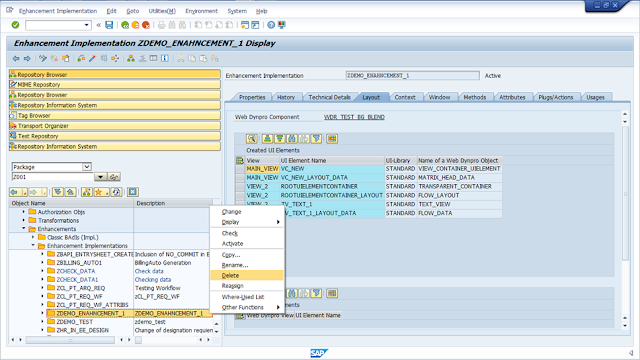
  • Go to transaction SE80
  • Select the package which you have saved the Enhancement object
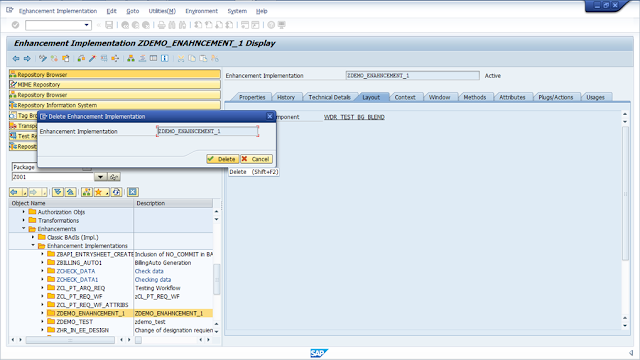
  • Select the implementation and delete it like it showed here.
SAP UI  Web Dynpro ABAP, SAP Guides, SAP All Modules, SAP Tutorials and Materials, SAP Live, SAP Learning

SAP UI  Web Dynpro ABAP, SAP Guides, SAP All Modules, SAP Tutorials and Materials, SAP Live, SAP Learning

Saturday, 12 November 2016

Web Dynpro ALV Configurator

Messy code replaced by Config Step


Anybody who has developed applications using SAP WD ALV component SALV_WD_TABLE, know’s how many lines of code is required to configure ALV to specific requirements. There’s getting instance of ALV model and then calling all sort of API methods to fine tune standard ALV like- sequence the columns, hide, rename the column header, set lead selection behaviors, set column width, editable ALV or not, set cell editors and many more. For complex scenarios – set cell variant, map column properties with other field value(from context).

Now think of a solution which provides an ALV configurator which can be used to do all the above configurations so that developer doesn’t have to write that boilerplate code. The whole functionality is delegated to an external application. Your ALV instance automatically adjusts itself to the values set in the configurator.

Let’s say during UAT phase of your project – user wants to re-sequence the columns and also update column headings – you just have to make changes in the configurator. This can be done by functional consultant on the project – no developer involved – no source code change.

The architecture of this solution supports abstracting the common ALV functions like – showing record count, custom excel export, etc so that they can be easily provisioned.

Here’s the overview diagram of the solution.

UI Web Dynpro ABAP, All SAP Modules, SAP Tutorials, SAP Certifications

Maintenance Cycle

UI Web Dynpro ABAP, All SAP Modules, SAP Tutorials, SAP Certifications

  1. Add ALV Usage to the business application
  2. Add ZALV Usage for every ALV usage in the application
  3. Execute the application once to update Z tables with original config values
  4. Run the ZALV configurator app to override the original config values with wrapper values
  5. Transport business application components and wrapper records to UT/IT/PD

Supported Features

  • Almost all the ALV config properties mapped
  • Supports all ALV column properties
  • Supports screen resolution based adaptation ( details in next point )
  • Supports config variants that can be selected based on qualifiers – eg – role name, screen size etc. So columns shown to ROLE_A can be different from ROLE_B. Similarly, more columns can be shown for higher resolution display.
  • Supports overriding wrapper config value by run time value. Eg – retain the dynamic control of column visibility
  • Custom ALV functions (ALV Buttons) can be built in ZALV component and provisioned to consumer apps
  • ‘Record Count’, ‘Full Screen’  and ‘Custom Export’ functions are currently available

Design Consideration

  • Non-invasive: Original component and its ALV config code is untouched
  • Fallback: Just remove ZALV usage for easy fallback
  • Usability
    • Configurator lists the applications which uses ZALV with easy search mechanism.
    • Drop Down selectors used for the properties. Value descriptions used instead of internal values.
    • Property names are same as the one used in code for easy reference
  • Z Tables
    • Separate tables used for config, columns and functions.
    • CONFIG_SOURCE field is used to easily identify source of config record
    • CONFIG_SOURCE = 01 : Original Config
    • CONFIG_SOURCE = 02 : Wrapper Config
With all said – the implementation is of proto-type (beta) quality and not any where near to production quality. I am making this open source on GITHUB so as to involve WD ABAP community to contribute, provide feedback/suggestions and use freely.

You can find more details in the github repository.

Wednesday, 28 September 2016

Identify changed data on screen in Web dynpro ABAP

AT times we require to check whether the editable fields are actually changed in value by the user or not.AS we all know that the values in the web dynpro component are stored in the context via nodes and attributes, there is a way to acheive this without much of coding. This documents gives the step by step procedure for the same.

The component here has a node which in turn has an attribute associated with it.

The purpose of this attribute is to bind it with an input field, now we will create the layout after creating this node in the context.

UI Web Dynpro ABAP, All SAP Modules, SAP Tutorials and Materials

The layout of view is as below

UI Web Dynpro ABAP, All SAP Modules, SAP Tutorials and Materials

On the click of this button we will be checking whether user has entered something in the input field or not, this can be modified as a “SAVE” button on screen wherein we can now check whether user has actually entered something or not or user has actually entered a new value here or not.

For this We will Enable the context change log in the WDDOINIT of component controller, please note that since the node was created in the component controller we write the code in WDDOINIT of the component controller, in case this was declared in view the below code has to be written in WDDOINIT of the view.

UI Web Dynpro ABAP, All SAP Modules, SAP Tutorials and Materials

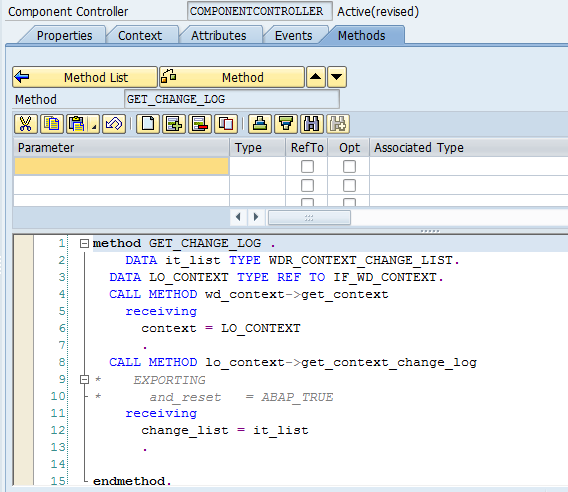
create a method in component controller , here its named as “GET_CHANGE_LOG” and code as below. this method will be called from the view.

UI Web Dynpro ABAP, All SAP Modules, SAP Tutorials and Materials

UI Web Dynpro ABAP, All SAP Modules, SAP Tutorials and Materials

The table IT_LIST will have values when the field is changed from the previous value else that would be “INITIAL”.

Below are the test results:

Execute the application and press the button without entering any value

UI Web Dynpro ABAP, All SAP Modules, SAP Tutorials and Materials

The internal table IT_LIST would be having no enteries.

UI Web Dynpro ABAP, All SAP Modules, SAP Tutorials and Materials

Now enter some value in the input field and press the button

UI Web Dynpro ABAP, All SAP Modules, SAP Tutorials and Materials

This time the internal table would have an entry as the context value was changed from previous held blank value

UI Web Dynpro ABAP, All SAP Modules, SAP Tutorials and Materials

Monday, 20 June 2016

Enhancements in Web Dynpro ABAP- Part I

This document will help you to understand the concept of the Enhancement implementation in standard web Dynpro ABAP Component.

Basically there is no option to enhance the Web Dynpro ABAP component through BADI or User Exit, hence sap has provided a way to do that called “Enhancement Implementation”.

Using Enhancement Implementation we can do the following enhancements.
  • Enhancement of Component
    • Creating New view
    • Creating New window
    • Creating New Controller
    • Creating New Application
  • Enhancement of Window
    • Enhancing Embed views / Adding new views
    • Enhancing navigation link / Adding New links
  • Enhancement of View
    • Enhancing UI elements / Adding New UI elements
    • Enhancing Plugs / Adding New Plugs
  • Enhancement of Controller
    • Enhancing standard methods & Actions / Adding New methods & Actions
    • Enhancing standard Context / Adding New Context
    • Enhancing standard Attributes / Adding New Attributes
  • Deleting the Enhancement Implementation
And in this part we will be seeing about Enhancement of View and Window Controller.

Enhancement Implementation for View:


To create the enhancement implementation for view follow the steps.

1. Open the Web Dynpro Component using SE80.

2. Open the desired View to Enhance, in this given example I will take Standard Test component WDR_TEST_BG_BLEND.

SAP Module, SAP All Modules, SAP Tutorials and Materials, SAP UI Web Dynpro ABAP

3. Select the view and click on the Enhance button to enhance it and please provide Enhancement name in the next popup.

SAP Module, SAP All Modules, SAP Tutorials and Materials, SAP UI Web Dynpro ABAP

SAP Module, SAP All Modules, SAP Tutorials and Materials, SAP UI Web Dynpro ABAP

4. Now to view will be converted to Change mode as like this.

SAP Module, SAP All Modules, SAP Tutorials and Materials, SAP UI Web Dynpro ABAP

So now you will get an option to add new UI elements and remove the existing UI elements under the enhancement option that you have created.

Now I am going to add a new text view under the root container and give some text to that.

SAP Module, SAP All Modules, SAP Tutorials and Materials, SAP UI Web Dynpro ABAP

SAP Module, SAP All Modules, SAP Tutorials and Materials, SAP UI Web Dynpro ABAP

Save the changes and activate the whole component along with your enhancement implementation and run the application.

SAP Module, SAP All Modules, SAP Tutorials and Materials, SAP UI Web Dynpro ABAP

Enhancement implementation for Window:


Here we are going to see about enhancing the Window and adding the new view,

In this example I am going to create a new view and call that view inside another view using view container and enhancing the window controller.

Enhance the View 1 and add the view container (VC_MAIN) at last to bind another view.

SAP Module, SAP All Modules, SAP Tutorials and Materials, SAP UI Web Dynpro ABAP

To add new view into the standard web Dynpro abap component right click on the view and select the option create as enhancement.

SAP Module, SAP All Modules, SAP Tutorials and Materials, SAP UI Web Dynpro ABAP

Then it will be asking for the enhancement implementation, then select the implementation that we have created.

SAP Module, SAP All Modules, SAP Tutorials and Materials, SAP UI Web Dynpro ABAP

After the selection of enhancement it will be like the process of normal view creation.

SAP Module, SAP All Modules, SAP Tutorials and Materials, SAP UI Web Dynpro ABAP

SAP Module, SAP All Modules, SAP Tutorials and Materials, SAP UI Web Dynpro ABAP

Enhance the window using same enhancement implementation, and bind the view for view container that we created.

SAP Module, SAP All Modules, SAP Tutorials and Materials, SAP UI Web Dynpro ABAP

SAP Module, SAP All Modules, SAP Tutorials and Materials, SAP UI Web Dynpro ABAP

Activate the whole component along with the enhancement implementation and execute the application.

SAP Module, SAP All Modules, SAP Tutorials and Materials, SAP UI Web Dynpro ABAP